Screen2Doc

Professional QA Documentation — From Screenshot to Report in Minutes

Capture. Annotate. Export. All offline, all private.

Get it on Microsoft Store See Features ↓

Free to use·Pro from €5.99/mo·100% Offline

Verified & distributed via Microsoft Store

A product by DandeFox

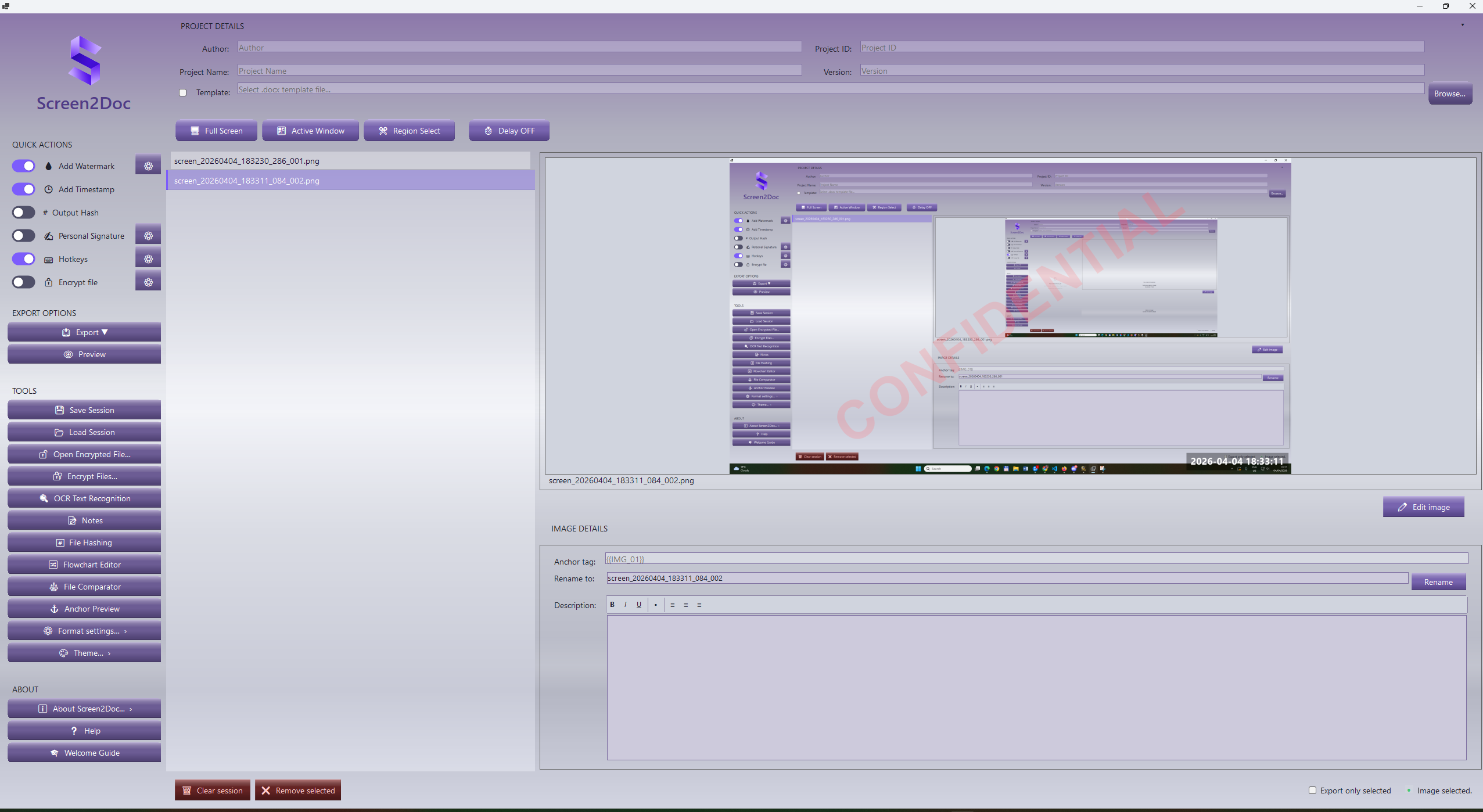
Screen2Doc Application Screenshot

How It Works

Three steps to professional documentation

📸
Step 1

Capture

Take fullscreen, active window, or region screenshots with one click or customizable hotkeys.

✏️
Step 2

Annotate

Edit images with arrows, text, shapes, blur, crop, zoom and more in the built-in editor.

📄
Step 3

Export

Generate polished DOCX, PDF, or RTF reports using customizable templates with dynamic anchors.

Features

📸 Screenshot Capture

Capture your entire screen, the active window, or a custom region with pixel-perfect precision. Set up global hotkeys for hands-free capture. Add delay timers for dropdown menus and tooltips.

  • Fullscreen / Active Window / Region
  • Global hotkeys
  • Configurable delay timer
  • Auto-save to session
✏️ Image Editor

A full-featured dark-themed image editor built for QA professionals. Annotate screenshots with precision tools — no external software needed.

  • Arrows, rectangles, ellipses, freehand
  • Text with rotation
  • Blur & crop (Pro)
  • Zoom, pan, grid overlay
  • Undo/redo history
📄 Template Export DOCX · PDF · RTF

Export professional reports using Word templates with dynamic anchor tokens. Insert screenshots, notes, hashes, and signatures automatically at export time.

  • {{IMG:ALL}} — insert all screenshots
  • {{NOTE:1}} — insert notes
  • {{SIGNATURE:IMAGE}} — personal signature
  • {{HASH:SHA256:1}} — file hashes
  • {{DECISION:group:option}} — conditional content
🔒 AES-256 Encryption PRO

Protect exported files with military-grade AES-256-CBC encryption and HMAC-SHA256 integrity verification. Each file gets a unique recovery key in case you forget your password.

  • AES-256-CBC + HMAC-SHA256
  • Unique recovery key per file
  • Password strength indicator
  • Batch encryption support
⚖️ File Comparator PRO

Compare files and folders with a Beyond Compare-style interface. Supports text diff with syntax highlighting, hex view, image comparison, folder sync, and three-way merge.

  • Text diff with line-level highlighting
  • Hex/binary view
  • Folder comparison with sync
  • 3-way merge
  • Image pixel diff
  • Export diff as HTML
#️⃣ File Hashing PRO

Generate cryptographic hashes for file integrity verification. Embed hash values directly into your export templates using anchor tokens.

  • SHA1, MD5, SHA256
  • Drag & drop files
  • Hash verification
  • Export as CSV/JSON
  • Template anchors {{HASH:alg:index}}
🔍 OCR Text Recognition

Extract text from screenshots using the Tesseract OCR engine. Copy recognized text to clipboard or insert it into your notes.

  • Tesseract 5.x engine
  • English language support
  • Copy to clipboard
  • Free: 5 uses/day · Pro: unlimited
✍️ Personal Signature PRO

Draw your signature on a canvas or import from an image file. Save multiple signature profiles. Signatures auto-embed in exports via {{SIGNATURE:IMAGE}} anchor.

  • Drawing canvas with pen thickness
  • 5 ink colors
  • Import from PNG/JPG
  • Multiple profiles
  • Auto-crop
🔀 Flowchart Editor PRO

Create visual workflow diagrams with a drag-and-drop editor. Document test flows, decision trees, and process maps.

  • Drag & drop nodes
  • Connection lines
  • Multiple node types
  • Save and load diagrams
📝 Notes System

Create rich text notes with formatting, categories, and labels. Embed notes in your export templates using {{NOTE:x}} anchors. RTF formatting preserved in exports.

  • Bold, italic, underline, alignment
  • Categories & labels
  • Search and filter
  • RTF export support
  • Free: 10 notes · Pro: unlimited
🎨 4 Visual Themes

Choose from 4 carefully designed themes. The DandeFox themes feature a unique metallic chrome gradient system with form-relative positioning.

  • Light — clean and minimal
  • Dark — easy on the eyes
  • DandeFox Light — silver chrome gradients
  • DandeFox Dark — dark chrome (Pro)
⌨️ Hotkey Automation

Configure global keyboard shortcuts that work even when Screen2Doc is in the background. Capture screenshots without switching windows.

  • Global hotkeys (system-wide)
  • Customizable key combinations
  • Works in background
  • Quick capture workflow

Choose Your Plan

Start free. Upgrade when you need the full toolkit.

Free

€0 / forever
  • Screenshot capture (all modes)
  • Image editor (basic tools)
  • DOCX export
  • Notes (max 10)
  • OCR (5 per day)
  • Watermark & timestamp
  • Light & Dark themes
  • Session save/load
  • PDF & RTF export
  • Encryption
  • File comparator
  • File hashing
  • Personal signature
  • Flowchart editor
  • DandeFox themes
  • Blur & crop tools
Download Free

Pro

€5.99 / month
14-day free trial included
  • Screenshot capture (all modes)
  • Image editor (all tools)
  • DOCX, PDF & RTF export
  • Unlimited notes
  • Unlimited OCR
  • Watermark & timestamp
  • All 4 themes
  • Session save/load
  • AES-256 encryption
  • File comparator
  • File hashing
  • Personal signature
  • Flowchart editor
  • Blur & crop tools
  • Priority support
Start Free Trial

Cancel anytime · Managed by Microsoft Store

Your Data Stays Yours

Built from the ground up with privacy as a core principle

🔒

100% Offline

No internet connection required. Every feature works fully offline.

🚫

Zero Data Collection

No analytics, no telemetry, no crash reports, no accounts. We never see your data.

🛡️

Local Processing

All screenshots, notes, signatures, and exports are stored only on your device.